

Last update Sep 16, 2026
Overview
A new eBay account typically starts at 10 items or $500 per month, whichever ceiling you hit first. eBay sets the exact figure per account and does not publish a universal number — you can see yours in Seller Hub under Monthly limits. Both your active and sold listings count toward the monthly total, and Good ‘Til Cancelled listings count too.
eBay reviews every account monthly and raises limits automatically based on sales volume and buyer feedback. You can also request an increase sooner from Seller Hub. See eBay’s own Selling limits page for the current rules.
| Stage | Typical monthly limit | What moves it |
|---|---|---|
| New account | Around 10 items or $500 | The first monthly review |
| After the first reviews | Raised automatically | Sales volume and buyer feedback |
| Established seller | Set per account | Performance, defect rate, category |
| New to a category | Separate category limit | Track record in that category |
Many eBay sellers, especially those who have recently opened an account, have heard of eBay sales limits, which are one of the safety measures deployed by eBay to make the marketplace a trustworthy buying and selling platform.
But what are selling limits, and how can you negotiate and increase them quickly?
What is a sell limit on eBay?
Why does eBay have a selling limit?
Selling limits are standard sales thresholds that vary based on a seller’s reputation within eBay.
eBay states that seller limits are meant to ensure the “sustainable growth of sellers’ businesses”, which is a nice way to say that any seller wishing to carve out a “retail space” must demonstrate reliability and have a profitable offer. Thanks to limitations, eBay can collect information on your business, behavior, and sales, making it easier to:
- Tell apart good sellers from scammers and suspend suspect accounts
- Understand the scalability of a user’s business
- Monitor the quality of services provided by sellers and the related customer satisfaction
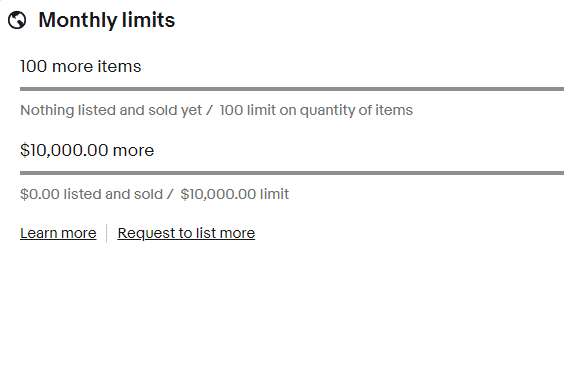
Limits are expressed as both a maximum number of items that a seller can list per month, and their maximum currency value. A new account typically starts around 10 items or $500 a month, whichever you reach first, though eBay sets the exact figure per account and only shows it when you are signed in (check the value in your own currency on your local eBay). The more sales and positive reviews you collect, the more your chances of a higher limit.
To be precise, eBay says that limits are calculated on the “number of listed items”, but does not specify that the limit considers both the number of products listed and the available stock for each individual product that has been published.
Therefore, if you are a new seller with a limit equal to 10 items, you can publish 10 different listings with stock =1 or even 1 listing with stock =100 (still respecting the $500 threshold). In both cases, you would have reached your monthly listing quota.
Pay attention to this aspect as it will come in handy later when talking about ways to grow faster still in total compliance of eBay’s limitations.
How to see my selling limit on eBay
Every seller has to comply with their limits, which vary from a store to another on the basis of selling metrics and customer satisfaction. Therefore, if you have or are planning to have multiple eBay accounts, each of your stores will have different selling limits. But how to check on them?
- Open eBay, and hover with the mouse on “My eBay”
- Click on ”Selling” to be redirected to the Seller Hub
- Scroll down to the “Monthly limits” quadrant
Learn how to sell multichannel: get free education, tips, and inspiration. Start growing your successful multichannel business.
By entering your email address, you accept our Privacy Policy and Terms of Use. Totally free. Unsubscribe at any time.
How to increase eBay selling limit
Requirements for increasing sales limits
As mentioned above, the eBay seller limits are calculated on the basis of a mix of quantitative and qualitative metrics. Therefore, in order to ask eBay seller support for a recalculation of the limits, you’ll need to comply with some prerequisites:
- Account history: all new eBay accounts can sell up to 10 items with a value of up to $500. That is because eBay doesn’t have a history for new accounts, hence needs to see how they perform before allowing to raise the limit. Selling restrictions here are meant as a “trial period” to test the trustworthiness of newcomer sellers. Hence, before asking for a limit raise, make sure to have some – positive – history in sales.
- Selling volumes: Since eBay charges over 10% on the total amount of each sale, they will of course prefer to increase sales limits for sellers that have high selling volumes.
- Customer satisfaction: last but not least, customer satisfaction is one of the leading aspects. Collecting positive reviews will be your passe-partout to scale your business.
Request higher selling limits
Now that you know what you need to ease selling restrictions, how can you request eBay to review them?
eBay reviews your account every month and adjusts the limits automatically based on your sales volume and the feedback you have received from buyers. If a seller meets the criteria, eBay gets in contact by email, communicating the new selling limits.
However, if you think your performance already justifies a raise before the next monthly review, you can submit a manual request in two ways:
- Through this eBay informative page
- Or via your Seller Hub > scrolling down to “Monthly limits” > and clicking on “ Request to list more”
How to get around eBay selling limits
There is no way to ignore or trick eBay’s limitations, plus it would be wrong. Nevertheless, you can grow faster, in compliance with them in two ways:
- Using Nembol Limit Listing Quantity function, which is designed to help sellers automatically mitigate the burden of limitations. With this function, you can list items with a reduced inventory, avoiding reaching the stock threshold. Once products are listed with a reduced inventory count, each time you sell one item out the reduced stock, Nembol will automatically refill it until the products actually go out of stock in your warehouse. Thanks to this function, you’ll be able to list your full product catalog and inventory without being stopped by limitations!
- Opening additional eBay accounts and starting to sell in different product categories, opening sort of niche stores. With Nembol, you can list on multiple eBay accounts and centrally manage their inventory effortlessly. This way, you won’t let eBay put you down with limitations and sell more, still being compliant with eBay marketplace rules!
Try Nembol for free: enjoy a 14-day trial
No credit card required
Frequently Asked Questions
Why has eBay put a selling limit on my account?
eBay sets selling limits for each seller based on account age, sales, and reviews, to keep the marketplace reliable. Nembol’s Inventory Control lets you list reduced stock, helping you stay within those limits.
How can I increase my selling limit on eBay?
To increase your eBay selling limit, eBay tends to raise limits for sellers with high sales volumes and positive reviews. Additionally, you can use Nembol to list items with reduced inventory, helping you avoid hitting the stock threshold and allowing you to manage your listings more effectively.
How many items a month can I sell on eBay?
According to eBay selling limits, new eBay accounts can sell up to 10 items or $500 total per month. Limits consider both listings and stock.
Where can I see my eBay selling limits?
Go to “My eBay” → “Selling” and scroll to the “Monthly limits” section. Each account has its own selling limits, based on seller’s history, performance and customer satisfaction.
How often does eBay review my selling limits?
Every month. eBay reviews your account and adjusts limits automatically based on your sales volume and the feedback you have received from buyers. You can also request an increase from Seller Hub without waiting for the review.
Do eBay selling limits count listings or stock?
Both. Your active and sold listings count toward the monthly limit, and quantity counts as well — ten listings with one unit each and one listing with ten units both consume the same allowance. Good ‘Til Cancelled listings also count.
Are there separate eBay selling limits per category?
Yes. eBay says that if you are new to selling in a particular category it may limit how much you can sell there, separately from your account limit. Those category limits are usually removed once you have a track record in that category.
What happens when I reach my eBay selling limit?
You cannot list more items that month until the limit resets or eBay raises it. eBay notifies you as you approach the limit and offers a request button in that message.